mirror of
https://github.com/alireza0/x-ui.git
synced 2026-03-18 14:55:49 +00:00

212 lines
6.3 KiB
Markdown
212 lines
6.3 KiB
Markdown
# x-ui
|
||

|
||

|
||
[](https://goreportcard.com/report/github.com/alireza0/x-ui)
|
||
[](https://img.shields.io/github/downloads/alireza0/x-ui/total.svg)
|
||
[](https://www.gnu.org/licenses/gpl-3.0.en.html)
|
||
> **Disclaimer: This project is only for personal learning and communication, please do not use it for illegal purposes, please do not use it in a production environment**
|
||
|
||
xray panel supporting multi-protocol, **Multi-lang (English,Farsi,Chinese)**
|
||
|
||
| Features | Enable? |
|
||
| ------------- |:-------------:|
|
||
| Multi-lang | :heavy_check_mark: |
|
||
| Search in deep | :heavy_check_mark: |
|
||
| Inbound Multi User | :heavy_check_mark: |
|
||
| Multi User Traffic & Expiration time | :heavy_check_mark: |
|
||
| REST API | :heavy_check_mark: |
|
||
| Telegram BOT (admin + clients) | :heavy_check_mark: |
|
||
| Backup database using Telegram BOT | :heavy_check_mark: |
|
||
|
||
**If you think this project is helpful to you, you may wish to give a** :star2:
|
||
|
||
# Features
|
||
|
||
- System Status Monitoring
|
||
- Search within all inbounds and clients
|
||
- Support multi-user multi-protocol, web page visualization operation
|
||
- Supported protocols: vmess, vless, trojan, shadowsocks, dokodemo-door, socks, http
|
||
- Support for configuring more transport configurations
|
||
- Traffic statistics, limit traffic, limit expiration time
|
||
- Customizable xray configuration templates
|
||
- Support https access panel (self-provided domain name + ssl certificate)
|
||
- Support one-click SSL certificate application and automatic renewal
|
||
- For more advanced configuration items, please refer to the panel
|
||
|
||
# Screenshot from Inbouds page
|
||
|
||

|
||
|
||
# Install & Upgrade
|
||
|
||
```
|
||
bash <(curl -Ls https://raw.githubusercontent.com/alireza0/x-ui/master/install.sh)
|
||
```
|
||
|
||
## Manual install & upgrade
|
||
|
||
1. First download the latest compressed package from https://github.com/alireza0/x-ui/releases , generally choose Architecture `amd64`
|
||
2. Then upload the compressed package to the server's `/root/` directory and `root` rootlog in to the server with user
|
||
|
||
> If your server cpu architecture is not `amd64` replace another architecture
|
||
|
||
```
|
||
cd /root/
|
||
rm x-ui/ /usr/local/x-ui/ /usr/bin/x-ui -rf
|
||
tar zxvf x-ui-linux-amd64.tar.gz
|
||
chmod +x x-ui/x-ui x-ui/bin/xray-linux-* x-ui/x-ui.sh
|
||
cp x-ui/x-ui.sh /usr/bin/x-ui
|
||
cp -f x-ui/x-ui.service /etc/systemd/system/
|
||
mv x-ui/ /usr/local/
|
||
systemctl daemon-reload
|
||
systemctl enable x-ui
|
||
systemctl restart x-ui
|
||
```
|
||
|
||
## Install using docker
|
||
|
||
> This docker tutorial and docker image are provided by [alireza0](https://github.com/alireza0)
|
||
|
||
1. install docker
|
||
|
||
```shell
|
||
curl -fsSL https://get.docker.com | sh
|
||
```
|
||
|
||
2. install x-ui
|
||
|
||
```shell
|
||
mkdir x-ui && cd x-ui
|
||
docker run -itd --network=host \
|
||
-v $PWD/db/:/etc/x-ui/ \
|
||
-v $PWD/cert/:/root/cert/ \
|
||
--name x-ui --restart=unless-stopped \
|
||
alireza7/x-ui:latest
|
||
```
|
||
|
||
> Build your own image
|
||
|
||
```shell
|
||
docker build -t x-ui .
|
||
```
|
||
|
||
## SSL certificate application
|
||
|
||
### Cloudflare
|
||
|
||
> This feature and tutorial are provided by [FranzKafkaYu](https://github.com/FranzKafkaYu)
|
||
|
||
### Certbot
|
||
|
||
```bash
|
||
snap install core; snap refresh core
|
||
snap install --classic certbot
|
||
ln -s /snap/bin/certbot /usr/bin/certbot
|
||
|
||
certbot certonly --standalone --register-unsafely-without-email --non-interactive --agree-tos -d <Your Domain Name>
|
||
```
|
||
|
||
## Tg robot use
|
||
|
||
> This feature and tutorial are provided by [FranzKafkaYu](https://github.com/FranzKafkaYu)
|
||
|
||
X-UI supports daily traffic notification, panel login reminder and other functions through the Tg robot. To use the Tg robot, you need to apply for the specific application tutorial. You can refer to the [blog](https://coderfan.net/how-to-use-telegram-bot-to-alarm-you-when-someone-login-into-your-vps.html)
|
||
Set the robot-related parameters in the panel background, including:
|
||
|
||
- Tg Robot Token
|
||
- Tg Robot ChatId
|
||
- Tg robot cycle runtime, in crontab syntax
|
||
- Tg robot Expiration threshold
|
||
- Tg robot Traffic threshold
|
||
- Tg robot Enable send backup in cycle runtime
|
||
- Tg robot Enable CPU usage alarm threshold
|
||
|
||
Reference syntax:
|
||
|
||
- 30 * * * * * //Notify at the 30s of each point
|
||
- @hourly // hourly notification
|
||
- @daily // Daily notification (00:00 in the morning)
|
||
- @every 8h // notify every 8 hours
|
||
|
||
### Telegram Bot Features
|
||
|
||
- Report periodic
|
||
- Login notification
|
||
- CPU threshold notification
|
||
- Threshold for Expiration time and Traffic to report in advance
|
||
- Support client report if client's telegram username is added to the end of `email` like 'test123@telegram_username'
|
||
- Menu based bot
|
||
- Search client by email
|
||
- Check all inbounds
|
||
- Check server status
|
||
- Check Exhausted users
|
||
- Receive backup by request and in periodic reports
|
||
|
||
|
||
|
||
## suggestion system
|
||
|
||
- CentOS 7+
|
||
- Ubuntu 16+
|
||
- Debian 8+
|
||
|
||
# common problem
|
||
|
||
## Migrating from v2-ui
|
||
|
||
First install the latest version of x-ui on the server where v2-ui is installed, and then use the following command to migrate, which will migrate the native v2-ui `All inbound account data` to x-ui,`Panel settings and username passwords are not migrated`
|
||
|
||
> Please `Close v2-ui` and `restart x-ui`, otherwise the inbound of v2-ui will cause a `port conflict with the inbound of x-ui`
|
||
|
||
```
|
||
x-ui v2-ui
|
||
```
|
||
|
||
# T-Shoots:
|
||
|
||
**If you upgrade from an old version or other forks, for enable traffic for users you should do :**
|
||
|
||
find this in config :
|
||
``` json
|
||
"policy": {
|
||
"system": {
|
||
```
|
||
**and add this just after ` "policy": {` :**
|
||
```json
|
||
"levels": {
|
||
"0": {
|
||
"statsUserUplink": true,
|
||
"statsUserDownlink": true
|
||
}
|
||
},
|
||
```
|
||
|
||
|
||
**the final output is like :**
|
||
```json
|
||
"policy": {
|
||
"levels": {
|
||
"0": {
|
||
"statsUserUplink": true,
|
||
"statsUserDownlink": true
|
||
}
|
||
},
|
||
|
||
"system": {
|
||
"statsInboundDownlink": true,
|
||
"statsInboundUplink": true
|
||
}
|
||
},
|
||
"routing": {
|
||
```
|
||
restart panel
|
||
|
||
# a special thanks to
|
||
- [HexaSoftwareTech](https://github.com/HexaSoftwareTech/)
|
||
- [FranzKafkaYu](https://github.com/FranzKafkaYu)
|
||
- [MHSanaei](https://github.com/MHSanaei)
|
||
|
||
## Stargazers over time
|
||
|
||
[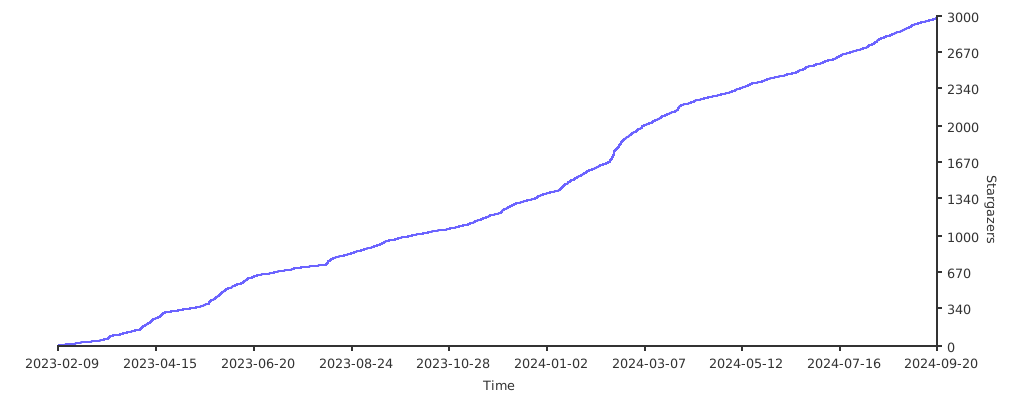](https://starchart.cc/alireza0/x-ui)
|