0fdd4dcfb9
* Update x-ui.sh

Change log:

- Made the code less bulky. More code = more potential for bugs and vulnerabilities

- The code is now showing the progress of downloads. Having the progres report allows us to see the errors and rectify them.

- Added a Success / Failure prompt for each download

- Solved the inherent problem with wget -O

  In the existing script, if a download fails, (i.e. if geofile.dat is not downloaded for any reason, wget -O creates
  an empty file by the same name and Xray will crash and won't recover and there's no way to know why.

- Current script gives the user an option to restart or not. It shouldn't be optional. That is fixed.

- Function restart() has already been defined in the script. There's no reason to use several lines for each
  restart. We're now using the existing function

- Unrelated: I took the liberty to brighten up the colours for the menu. If that's not what you like, please
  feel free to revert it back.

* Update x-ui.sh

- Removed Iran.dat as it no longer will be supported in the new version.
- Removed the notice about additional 2 files.
- changed restart() to confirm_restart()
- Reverted back to original colours.
X-UI
Advanced GUI panel based on Xray Core supports multiple protocols and languages




Disclaimer: This project is only for personal learning and communication, please do not use it for illegal purposes, please do not use it in a production environment
If you think this project is helpful to you, you may wish to give a 🌟
Buy Me a Coffee :
- USDT Tron (TRC20):
TYTq73Gj6dJ67qe58JVPD9zpjW2cc9XgVz - Tezos (XTZ):
tz2Wnh2SsY1eezXrcLChu6idWpgdHzUFQcts
Quick Look
| Features | Enable? |
|---|---|
| Multi-Protocol | ✔️ |
| Multi-Language | ✔️ |
| Multi-User Inbounds | ✔️ |
| Advanced Traffic Routing | ✔️ |
| REST API | ✔️ |
| Show Online Users | ✔️ |
| Manage Users Traffic Data & Expiry Date | ✔️ |
| Apply Expiry Date based on First Usage | ✔️ |
| Telegram Bot (admin + clients) | ✔️ |
| Database Backup using Telegram Bot | ✔️ |
| Subscription Link + UserInfo | ✔️ |
| Search in Deep | ✔️ |
| Dark/Light Theme | ✔️ |
Install & Upgrade to Latest Version
bash <(curl -Ls https://raw.githubusercontent.com/alireza0/x-ui/master/install.sh)
Install Custom Version
To install your desired version you can add the version to the end of install command. Example for ver 0.5.2:
bash <(curl -Ls https://raw.githubusercontent.com/alireza0/x-ui/master/install.sh) 0.5.2
Manual Install & Upgrade
- First download the latest compressed package from https://github.com/alireza0/x-ui/releases, generally choose Architecture
amd64 - Then upload the compressed package to the server's
/root/directory and login to the server with userroot
If your server cpu architecture is not
amd64replace another architecture
ARCH=$(uname -m)
[[ "${ARCH}" == "s390x" ]] && XUI_ARCH="s390x" || [[ "${ARCH}" == "aarch64" || "${ARCH}" == "arm64" ]] && XUI_ARCH="arm64" || XUI_ARCH="amd64"
cd /root/
rm x-ui/ /usr/local/x-ui/ /usr/bin/x-ui -rf
tar zxvf x-ui-linux-${XUI_ARCH}.tar.gz
chmod +x x-ui/x-ui x-ui/bin/xray-linux-* x-ui/x-ui.sh
cp x-ui/x-ui.sh /usr/bin/x-ui
cp -f x-ui/x-ui.service /etc/systemd/system/
mv x-ui/ /usr/local/
systemctl daemon-reload
systemctl enable x-ui
systemctl restart x-ui
Install Using Docker
- Install Docker
curl -fsSL https://get.docker.com | sh
- Install X-UI
mkdir x-ui && cd x-ui
docker run -itd \
    -p 54321:54321 -p 443:443 -p 80:80 \
    -e XRAY_VMESS_AEAD_FORCED=false \
    -v $PWD/db/:/etc/x-ui/ \
    -v $PWD/cert/:/root/cert/ \
    --name x-ui --restart=unless-stopped \
    alireza7/x-ui:latest
Build your own image
docker build -t x-ui .
Languages
- English
- Chinese
- Farsi
- Russian
- Vietnamese
Features
- Supported protocols: VMess, VLESS, Trojan, Shadowsocks, Dokodemo-door, SOCKS, HTTP
- Support XTLS native encryptions (Vision, REALITY)
- Support advanced JSON editor GUI for Xray-Core configuration
- Support advanced GUI for routing traffic (Reverse and Transparent proxy, Multi-Domain, Multi-Certificate, Multi-Port per inbound)
- Support Multi-User per inbound
- Support applying traffic data limits and expiry dates per user/inbound
- Support system status monitoring
- Support deep database search
- Show traffic statistics
- Show online users
- Show users with expired date or exceeded traffic limits
- Support subscription (multi) link
- Support import/export database
- Support One-Click SSL certificate application and automatic renewal
- Support HTTPS for panel (self-provided domain name + SSL certificate)
- Support Dark/Light theme UI
Recommended OS
- CentOS 8+
- Ubuntu 20+
- Debian 10+
- Fedora 36+
Screenshots


API Routes
Click for details
Usage
/loginwithPUSHuser data:{username: '', password: ''}for login/xui/API/inboundsbase for following actions:
| Method | Path | Action |
|---|---|---|
GET |
"/" |
Get all inbounds |
GET |
"/get/:id" |
Get inbound with inbound.id |
GET |
"/createbackup" |
Telegram bot sends backup to admins |
POST |
"/add" |
Add inbound |
POST |
"/del/:id" |
Delete inbound |
POST |
"/update/:id" |
Update inbound |
POST |
"/addClient/" |
Add client to inbound |
POST |
"/:id/delClient/:clientId" |
Delete client by clientId* |
POST |
"/updateClient/:clientId" |
Update client by clientId* |
GET |
"/getClientTraffics/:email" |
Get client's traffic |
POST |
"/:id/resetClientTraffic/:email" |
Reset client's traffic |
POST |
"/resetAllTraffics" |
Reset traffics of all inbounds |
POST |
"/resetAllClientTraffics/:id" |
Reset inbound clients traffics (-1: all) |
POST |
"/delDepletedClients/:id" |
Delete inbound depleted clients (-1: all) |
POST |
"/onlines" |
Get online users ( list of emails ) |
*- The field clientId should be filled by:
client.idfor VMess and VLESSclient.passwordfor Trojanclient.emailfor Shadowsocks
Environment Variables
Click for details
Usage
| Variable | Type | Default |
|---|---|---|
| XUI_LOG_LEVEL | "debug" | "info" | "warn" | "error" |
"info" |
| XUI_DEBUG | boolean |
false |
| XUI_BIN_FOLDER | string |
"bin" |
| XUI_DB_FOLDER | string |
"/etc/x-ui" |
SSL Certificate
Click for details
Certbot
snap install core; snap refresh core
snap install --classic certbot
ln -s /snap/bin/certbot /usr/bin/certbot

certbot certonly --standalone --register-unsafely-without-email --non-interactive --agree-tos -d <Your Domain Name>
Telegram Bot
Click for details
Usage
X-UI supports daily traffic notification, panel login reminder and other functions through the Tg robot. To use the Tg robot, you need to apply for the specific application tutorial. You can refer to the blog Set the robot-related parameters in the panel background, including:
- Tg robot Token
- Tg robot ChatId
- Tg robot cycle runtime, in crontab syntax
- Tg robot Expiration threshold
- Tg robot Traffic threshold
- Tg robot Enable send backup in cycle runtime
- Tg robot Enable CPU usage alarm threshold
Reference syntax:
- 30 * * * * * //Notify at the 30s of each point
- 0 */10 * * * * //Notify at the first second of each 10 minutes
- @hourly // hourly notification
- @daily // Daily notification (00:00 in the morning)
- @every 8h // notify every 8 hours
Features
- Report periodic
- Login notification
- CPU threshold notification
- Threshold for Expiration time and Traffic to report in advance
- Support client report menu if client's telegram ID or telegram UserName added to the user's configurations
- Support telegram traffic report searched with UUID (VMESS/VLESS) or Password (TROJAN) - anonymously
- Menu based bot
- Search client by email ( only admin )
- Check all inbounds
- Check server status
- Check depleted users
- Receive backup by request and in periodic reports
- Multi language bot
Troubleshoots
Click for details
Enable Traffic Usage
Please be aware if you upgrade from an old X-UI version or other forks, by default data traffic usage for users may not work! it's recommended to follow below steps for enabeling:
- Find this section in config file
 "policy": {
    "system": {
- Add below section just after
"policy": {:
    "levels": {
      "0": {
        "statsUserUplink": true,
        "statsUserDownlink": true
      }
    },
- The final output is like:
  "policy": {
    "levels": {
      "0": {
        "statsUserUplink": true,
        "statsUserDownlink": true
      }
    },

    "system": {
      "statsInboundDownlink": true,
      "statsInboundUplink": true
    }
  },
  "routing": {
- Save and restart panel
a Special Thanks to
Acknowledgment
- Iran Hosted Domains (License: MIT): A comprehensive list of Iranian domains and services that are hosted within the country.
- PersianBlocker (License: AGPLv3): An optimal and extensive list to block ads and trackers on Persian websites.
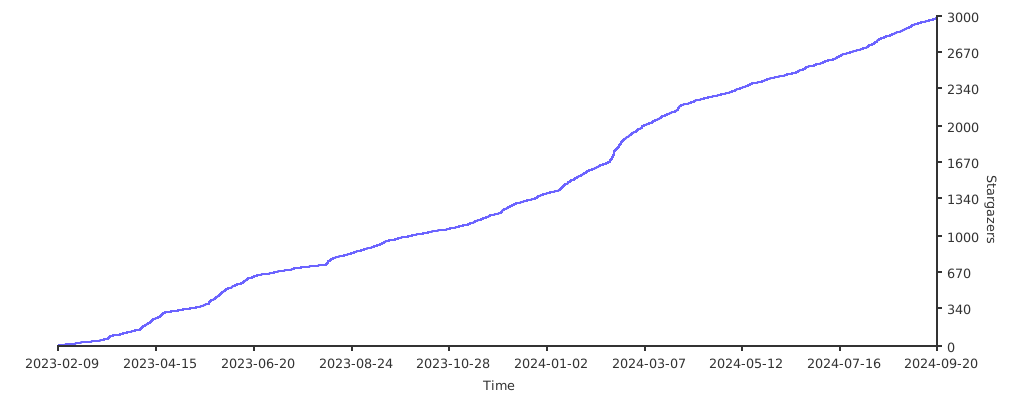
Stargazers over Time