 dcb45d4f6b
* Moved default bootstrap dirs into single /bootstrap parent dir in order to have single docker volume bind (with fallback to previous folder hierarchy)
* Added default values for LDAP user and credentials
* Added support for bootstrapping schema

Place schema files under /bootstrap/(user|group)-schemas/*.json

Sample content:
[
  {
    "name" : "test_attrib",
    "attributeType" : "STRING",
    "isEditable" : true,
    "isList" : false,
    "isVisible" : true
  }
]
9.7 KiB
Bootstrapping lldap using bootstrap.sh script
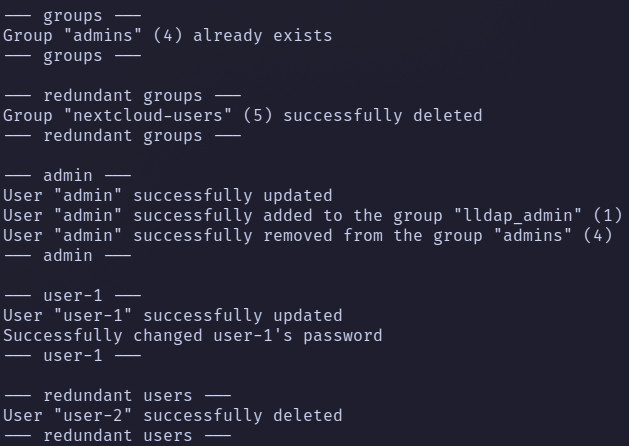
bootstrap.sh allows managing your lldap in a git-ops, declarative way using JSON config files.
The script can:
- create, update users
- set/update all lldap built-in user attributes
- add/remove users to/from corresponding groups
- set/update user avatar from file, link or from gravatar by user email
- set/update user password
- create groups
- delete redundant users and groups (when
DO_CLEANUPenv var is true) - maintain the desired state described in JSON config files
- create user/group user-defined attributes
Required packages
The script will automatically install the required packages for alpine and debian-based distributions when run by root, or you can install them by yourself.
Environment variables
LLDAP_URLorLLDAP_URL_FILE(default value:http://localhost:17170) - URL to your lldap instance or path to file that contains URLLLDAP_ADMIN_USERNAMEorLLDAP_ADMIN_USERNAME_FILE(default value:admin) - admin username or path to file that contains usernameLLDAP_ADMIN_PASSWORDorLLDAP_ADMIN_PASSWORD_FILE(default value:password) - admin password or path to file that contains passwordUSER_CONFIGS_DIR(default value:/bootstrap/user-configs) - directory where the user JSON configs could be foundGROUP_CONFIGS_DIR(default value:/bootstrap/group-configs) - directory where the group JSON configs could be foundUSER_SCHEMAS_DIR(default value:/bootstrap/user-schemas) - directory where the user schema JSON configs could be foundGROUP_SCHEMAS_DIR(default value:/bootstrap/group-schemas) - directory where the group schema JSON configs could be foundLLDAP_SET_PASSWORD_PATH- path to thelldap_set_passwordutility (default value:/app/lldap_set_password)DO_CLEANUP(default value:false) - delete groups and users not specified in config files, also remove users from groups that they do not belong to
Config files
There are two types of config files: group and user configs. Each config file can be as one JSON file with nested JSON top-level values as several JSON files.
Group config file example
Group configs are used to define groups that will be created by the script
Fields description:
name: name of the group (MANDATORY)
{
  "name": "group-1"
}
{
  "name": "group-2"
}
User config file example
User config defines all the lldap user structures, if the non-mandatory field is omitted, the script will clean this field in lldap as well.
Fields description:
id: it's just username (MANDATORY)email: self-explanatory (MANDATORY)password: would be used to set the password usinglldap_set_passwordutilitydisplayName: self-explanatoryfirstName: self-explanatorylastName: self-explanatoryavatar_file: must be a valid path to jpeg file (ignored ifavatar_urlspecified)avatar_url: must be a valid URL to jpeg file (ignored ifgravatar_avatarspecified)gravatar_avatar(falseby default): the script will try to get an avatar from gravatar by previously specifiedemail(has the highest priority)weserv_avatar(falseby default): avatar file fromavatar_urlorgravatar_avatarwould be converted to jpeg using wsrv.nl (useful when your avatar is png)groups: an array of groups the user would be a member of (all the groups must be specified in group config files)
{
  "id": "username",
  "email": "username@example.com",
  "password": "changeme",
  "displayName": "Display Name",
  "firstName": "First",
  "lastName": "Last",
  "avatar_file": "/path/to/avatar.jpg",
  "avatar_url": "https://i.imgur.com/nbCxk3z.jpg",
  "gravatar_avatar": "false",
  "weserv_avatar": "false",
  "groups": [
    "group-1",
    "group-2"
  ]
}
User and group schema config file example
User and group schema have the same structure.
Fields description:
name: name of field, case insensitve - you should use lowercaseattributeType:STRING/INTEGER/JPEG/DATE_TIMEisList: single on multiple value fieldisEditable: self-explanatoryisVisible: self-explanatory
[
  {
    "name": "uid",
    "attributeType": "INTEGER",
    "isEditable": false,
    "isList": false,
    "isVisible": true
  },
  {
    "name": "mailbox",
    "attributeType": "STRING",
    "isEditable": false,
    "isList": false,
    "isVisible": true
  },
  {
    "name": "mail_alias",
    "attributeType": "STRING",
    "isEditable": false,
    "isList": true,
    "isVisible": true
  }
]
Usage example
Manually
The script can be run manually in the terminal for initial bootstrapping of your lldap instance. You should make sure that the required packages are installed and the environment variables are configured properly.
export LLDAP_URL=http://localhost:8080
export LLDAP_ADMIN_USERNAME=admin
export LLDAP_ADMIN_PASSWORD=changeme
export USER_CONFIGS_DIR="$(realpath ./configs/user)"
export GROUP_CONFIGS_DIR="$(realpath ./configs/group)"
export USER_SCHEMAS_DIR="$(realpath ./configs/user-schema)"
export GROUP_SCHEMAS_DIR="$(realpath ./configs/group-schema)"
export LLDAP_SET_PASSWORD_PATH="$(realpath ./lldap_set_password)"
export DO_CLEANUP=false
./bootstrap.sh
Manually from running docker container or service
After setting a docker container you can bootstrap users using:
docker exec -e LLDAP_ADMIN_PASSWORD_FILE=password -v ./bootstrap:/bootstrap -it $(docker ps --filter name=lldap -q) /app/bootstrap.sh
Docker compose
Let's suppose you have the next file structure:
./
├─ docker-compose.yaml
└─ bootstrap
   ├─ bootstrap.sh
   └─ user-configs
   │  ├─ user-1.json
   │  ├─ ...
   │  └─ user-n.json
   └─ group-configs
   |  ├─ group-1.json
   |  ├─ ...
   |  └─ group-n.json
   └─ user-schemas
   |  ├─ user-attrs-1.json
   |  ├─ ...
   |  └─ user-attrs-n.json
   └─ group-schemas
      ├─ group-attrs-1.json
      ├─ ...
      └─ group-attrs-n.json
You should mount bootstrap dir to lldap container and set the corresponding env variables:
version: "3"

services:
  lldap:
    image: lldap/lldap:v0.5.0
    volumes:
      - ./bootstrap:/bootstrap
    ports:
      - "3890:3890" # For LDAP
      - "17170:17170" # For the web front-end
    environment:
      # envs required for lldap
      - LLDAP_LDAP_USER_EMAIL=admin@example.com
      - LLDAP_LDAP_USER_PASS=changeme
      - LLDAP_LDAP_BASE_DN=dc=example,dc=com

      # envs required for bootstrap.sh
      - LLDAP_URL=http://localhost:17170
      - LLDAP_ADMIN_USERNAME=admin
      - LLDAP_ADMIN_PASSWORD=changeme # same as LLDAP_LDAP_USER_PASS
      - USER_CONFIGS_DIR=/bootstrap/user-configs
      - GROUP_CONFIGS_DIR=/bootstrap/group-configs
      - USER_SCHEMAS_DIR=/bootstrap/user-schemas
      - GROUP_SCHEMAS_DIR=/bootstrap/group-schemas
      - DO_CLEANUP=false
Then, to bootstrap your lldap just run docker compose exec lldap /bootstrap/bootstrap.sh.
If config files were changed, re-run the bootstrap.sh with the same command.
Kubernetes job
apiVersion: batch/v1
kind: Job
metadata:
  name: lldap-bootstrap
  # Next annotations are required if the job managed by Argo CD,
  # so Argo CD can relaunch the job on every app sync action
  annotations:
    argocd.argoproj.io/hook: PostSync
    argocd.argoproj.io/hook-delete-policy: BeforeHookCreation
spec:
  template:
    spec:
      restartPolicy: OnFailure
      containers:
        - name: lldap-bootstrap
          image: lldap/lldap:v0.5.0

          command:
            - /bootstrap/bootstrap.sh

          env:
            - name: LLDAP_URL
              value: "http://lldap:8080"

            - name: LLDAP_ADMIN_USERNAME
              valueFrom: { secretKeyRef: { name: lldap-admin-user, key: username } }

            - name: LLDAP_ADMIN_PASSWORD
              valueFrom: { secretKeyRef: { name: lldap-admin-user, key: password } }

            - name: DO_CLEANUP
              value: "true"

          volumeMounts:
            - name: bootstrap
              mountPath: /bootstrap/bootstrap.sh
              readOnly: true
              subPath: bootstrap.sh

            - name: user-configs
              mountPath: /bootstrap/user-configs
              readOnly: true

            - name: group-configs
              mountPath: /bootstrap/group-configs
              readOnly: true

      volumes:
        - name: bootstrap
          configMap:
            name: bootstrap
            defaultMode: 0555
            items:
              - key: bootstrap.sh
                path: bootstrap.sh

        - name: user-configs
          projected:
            sources:
              - secret:
                  name: lldap-admin-user
                  items:
                    - key: user-config.json
                      path: admin-config.json
              - secret:
                  name: lldap-password-manager-user
                  items:
                    - key: user-config.json
                      path: password-manager-config.json
              - secret:
                  name: lldap-bootstrap-configs
                  items:
                    - key: user-configs.json
                      path: user-configs.json

        - name: group-configs
          projected:
            sources:
              - secret:
                  name: lldap-bootstrap-configs
                  items:
                    - key: group-configs.json
                      path: group-configs.json